A Quiet Way to Add Comments
Notes on integrating a comment section with Astro, motion, and modular simplicity.
July 11, 2025
There’s something gentle about the idea of a comment section. Not as a forum. Not a battleground.
But a small space — where something written can ripple outward, and sometimes return.
For Writ in Light, I wanted a way to allow that kind of response.
Quiet. Lightweight. Easy to step into.
This is how I built it.
Choosing a Tool That Doesn’t Shout
I explored a few options. First, it had to support static-only deployment. The uncertainty of the reach of this site led me hesitant to yet change to a full web page deployment. Keeping it static would keep my financial risk to a minimum.
This tightened the possibilities to just Giscus, Disqus and a nice little open-source project called Cusdis.
Giscus was too developer-centric, requiring Github signin.
Disqus was too heavy and tracker-laden, too eager.
I ended up choosing Curdis — an free, cloud-hosted service.
It doesn’t require users to sign in. It doesn’t track.
It just works.
Built in Layers
The site follows atomic design principles. So the comment section became its own organism:
- PulseLine — A single placeholder shimmer
- CommentLoader — Three staggered lines to mimic text loading
- CommentSection — The full block, including heading, intro text, and the embedded thread
This kept things flexible and poetic.
Even the loading state became a soft invitation, not just a spinner.
Letting It Breathe In
Rather than load upfront, the comment section only appears when scrolled to.
That’s done with IntersectionObserver — a native browser API.
Once it appears, the script for Cusdis is injected.
Until then, a gentle pulse animation shows the space waiting.
The motion is handled with Framer Motion , so the entry feels organic — like something appearing under candlelight. To think the last post I was stating my choice of only Astro, and now returns React.
Making It Visibly Gentle
Because Cusdis renders inside an iframe, I needed to make sure it wasn’t clipped or stuck.
I added styles like:
#cusdis_thread iframe {
  width: 100%;
  height: auto;
  min-height: 350px;
  overflow: visible;
  background: transparent;
  border: none;
}
And made sure no parent containers had overflow: hidden that could trap it.
The result: no scrollbars, no cutoff. Just words, when they arrive.
At least, that’s what I hoped for. I still faced issues with the scrollbar even after making sure there were no hidden overflows. Perhaps I will try the self-hosted version when I require a back-end for my tools section. Else, migration to my own custom comment section may be more suitable then. Until then, this current setup is more than sufficient.
A Slow Production Process
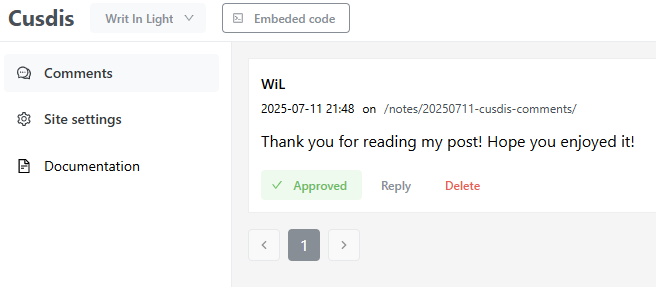
The Cusdis implementation only allows manually approved comments to be visible. Each thought rests in quiet waiting, seen in its own time. I’ll bring your words to light, when the moment is right.
The Text Beneath the Text
At the end of each post, the section appears:
Write something in the light. A quiet sentence. An open box.
If someone leaves something, it lingers there — as a kind of echo. If not, the space still held it open.
That felt like the right balance.
It loads fast, respects silence, and lets readers choose when to speak.
That’s all I wanted from it.
Write something in the light
Leave a thought, reflection, or a quiet ripple below.